Media Backup. Your Media Safe in Multiple Locations
Intelligent, distributed backup strategies for maximum data security
When One Backup Isn't Enough
You know the rule: data only truly exists when it is backed up in at least three locations. But how realistic is that when dealing with terabytes of video material, thousands of photos, and constantly growing archives? Classic backup solutions quickly hit their limits: too expensive, too inflexible, too complex. With footage.one you build an intelligent, distributed backup system that grows with your requirements — without losing control or oversight.
The Challenge
The Dilemma of Classic Backup Strategies
Costs out of control
A complete cloud backup? With several terabytes of material, costs spiral quickly. Multiple backups? Even more unaffordable.
Vendor lock-in
You chose a backup provider and later discover: prices are rising, performance is lacking, service is declining. But switching would take weeks and require a complete reorganisation.
Lack of flexibility
Your current projects need to be readily accessible, while older archives can take longer to retrieve. But most systems make no distinction. Everything sits on the same (expensive) storage.
Lack of overview
You have media on NAS, in the cloud, on external hard drives. But which version is where? Which is the original? What has already been backed up, what hasn't?
Complex management
Each storage location has its own management interface. You jump between different systems just to maintain an overview.
The Solution: Distributed Backups with Central Control
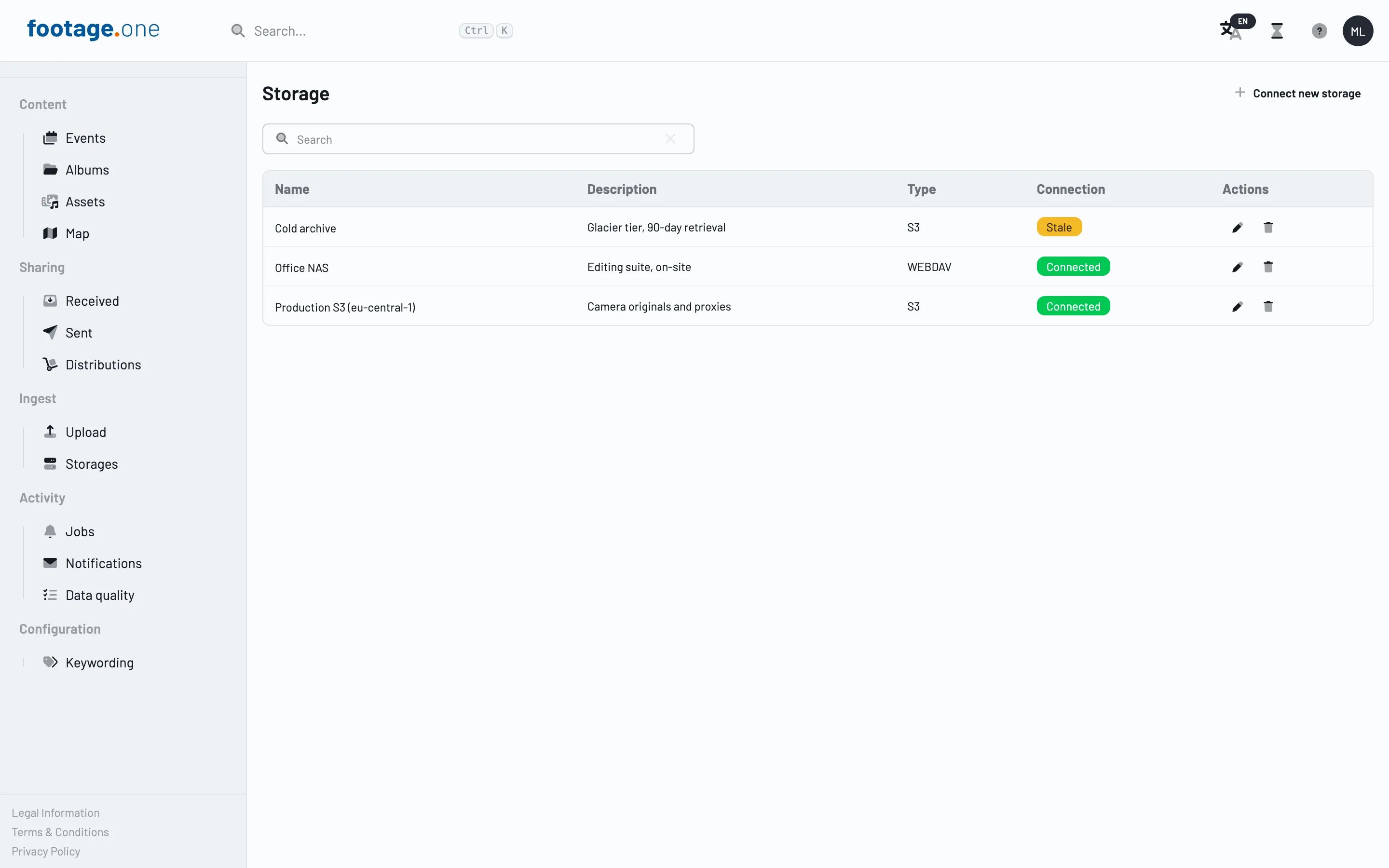
footage.one manages references to your media across different storage locations. This means: your originals can simultaneously reside on a local NAS, in the cloud (AWS S3, Google Cloud Storage, Azure), and with a further backup provider — and you still see everything in a single interface.
How It Works
Storage-agnostic architecture
footage.one separates the management of your media from its physical storage location. The system knows all copies of an asset and where they reside, whether on WebDAV, S3, NAS, or tape.
Intelligent reference management
Instead of copying files multiple times, footage.one manages references. You see your asset once, but can define that it should physically reside in three different locations.
Flexible backup strategies
Define different strategies for different asset types: current projects are backed up to fast SSD-NAS and S3 Standard. Completed projects additionally migrate to Glacier or tape. Critical material resides redundantly with two different cloud providers.
Automatic synchronisation
New assets are automatically distributed according to your backup strategy. You import once; footage.one handles the replication.
Preview without the original
footage.one creates low-resolution previews that remain locally available. You can browse your archive, review content, and edit metadata at any time, even when the originals are on offline storage.
Key Benefits
Cost optimisation through intelligent tiering
Combine expensive, fast storage for current projects with cost-effective archive solutions for older content. footage.one helps you reduce storage costs without compromising on security.
Genuine redundancy
No single storage location is 100% secure, but several together are. Define where assets should reside, and footage.one ensures the copies stay current.
Maximum flexibility
Use exactly the storage solutions that suit your requirements: local NAS for fast access, AWS S3 for cloud backup, Azure for geo-redundancy, Synology for local backup, external tape for long-term archiving.
No vendor lock-in
You can add or swap storage at any time without having to overhaul your entire backup strategy. Migrations run in the background while you continue working.
Centralised metadata management
Regardless of where your files physically reside: tagging, rights, project information, and all other metadata remain centrally managed. You do not need to maintain the same information on every storage location.
Disaster recovery
If a storage location fails — whether through hardware failure, ransomware, or natural disaster — you have copies elsewhere. footage.one immediately shows you which assets are affected and where the backups reside.
Complete traceability
For every asset you can see exactly where it resides, when it was last backed up, and whether all backup copies are current. Alerts notify you when something is missing.
Scalability
Your archive is growing? Simply add more storage. footage.one scales with your requirements without needing to rebuild the system.
Typical Use Cases
Production Companies
Current shoots on fast local SAN for maximum editing performance. Simultaneous automatic backup to AWS S3 for cloud security. After project completion, archiving to S3 Glacier and additionally to LTO tape for long-term archiving. All centrally managed without disrupting the workflow.
Agencies and Marketing Departments
Active campaigns on local NAS for fast team access. Automatic backup to Google Cloud Storage. Completed campaigns are automatically moved to cost-effective cold storage after three months. Critical brand assets reside redundantly with two different cloud providers.
Broadcasters and Television Stations
Multi-layer backup strategy with high-performance storage for active productions, nearline storage for recently broadcast content, and offline tape libraries for the long-term archive. Everything centrally managed via footage.one, with automatic migration between storage tiers.
Corporate Communications
Important corporate videos, event documentation, and press images are automatically backed up to internal NAS, Azure Cloud, and additionally to a dedicated backup NAS at a second site. In the event of critical reputational risks, all copies can be quickly identified and withdrawn.
Archivists and Documentation Centres
Historical material is migrated from old storage to modern cloud infrastructure whilst being preserved in parallel on physical media (LTO). footage.one manages both worlds and enables access through a single interface.
Freelancers and Small Studios
A combination of local storage for working, affordable cloud storage for backup, and an external hard drive for a third copy. footage.one makes enterprise-grade backup strategies affordable and manageable for small teams too.
Storage Types and Their Ideal Use
footage.one supports a broad range of storage solutions that can be optimally combined:
Local storage
- NAS (Synology, QNAP, etc.): Fast access, full control
- SAN: Highest performance for production environments
- WebDAV servers: Flexible integration of existing infrastructure
Cloud storage
- AWS S3 / S3 Glacier: Scalable, multiple storage classes
- Google Cloud Storage: Nearline and Coldline for archiving
- Azure Blob Storage: Hot, Cool, and Archive tiers
- Dropbox, Google Drive, OneDrive: Simple cloud integration
Long-term archives
- LTO tape libraries: Cost-effective for very large data volumes
- Optical storage: WORM media for immutable archives
Each storage type has its strengths, and footage.one helps you combine them optimally.
Automated Backup Workflows
footage.one transforms backups from a manual task into an automated process:
Rule-based distribution
Define rules: "All videos over 50 GB are backed up to local NAS and S3", "Completed projects additionally migrate to Glacier after 90 days", "Assets tagged 'critical' always reside in at least three locations".
Time-controlled archiving
Older content can be automatically migrated to more cost-effective storage, while current projects remain on high-performance storage.
Validation and alerts
footage.one regularly checks whether all backup copies are present and consistent. You are automatically notified if something is wrong.
One-click restoration
When you need an asset from a specific storage location, footage.one can retrieve it for you — even if it currently resides on Glacier or tape.
Integration and Migration
Incorporating existing storage
Do you already have media distributed across various storage locations? footage.one can incorporate these existing structures and give you unified access.
Gradual migration
You do not need to change everything at once. New media can be backed up under new rules while old structures continue to run in parallel.
Import without moving
footage.one can reference media without physically moving it. This saves time and bandwidth during the initial setup.
Security and Compliance
Encryption
All transfers are encrypted. Storage can be populated with encrypted data (encryption at rest).
Access controls
Define exactly who may access which storage. Not everyone needs access to all backup copies.
Audit logs
All accesses, changes, and backup operations are recorded. This is important for compliance requirements.
GDPR compliance
For personal data, you can fully trace where all copies reside and delete them without gaps if required.
Your Data, Your Strategy
footage.one gives you the tools for a backup strategy that suits your requirements, your budget, and your infrastructure. From the simple two-storage solution for freelancers to the complex multi-tier architecture for broadcasters — footage.one scales with your needs.
Let's develop a backup strategy together that genuinely protects your media without breaking your budget.